
Como ya hemos mencionado, la consola ser´a nuestra interfaz principal. Podemos lanzarla usando el comando msfconsole.
Una vez abierta, veremos que la linea de comandos cambia a msf6. La línea de comandos de metasploit puede ser usada como una linea de comandos normal, ejecutando por ejemplo ls para listar los contenidos del directorio desde el cual se lanzó. Seguido de un ping mandado a Google (8.8.8.8).
msf6 > ls
[*] exec: ls

burpsuite_community_linux_v2021_8_1.sh	Instructions  Scripts
Desktop					Pictures      thinclient_drives
Downloads				Postman       Tools
msf6 > ping -c 1 8.8.8.8
[*] exec: ping -c 1 8.8.8.8

PING 8.8.8.8 (8.8.8.8) 56(84) bytes of data.
64 bytes from 8.8.8.8: icmp_seq=1 ttl=109 time=1.33 ms

--- 8.8.8.8 ping statistics ---
1 packets transmitted, 1 received, 0% packet loss, time 0ms
rtt min/avg/max/mdev = 1.335/1.335/1.335/0.000 ms
msf6 >
Soportará la mayoría de comandos Linux, incluyendo clear, pero no dejará usar ciertas funciones (como la redirección >).
msf6 > help > help.txt
[-] No such command
msf6 >
El comando help puede ser usado por sí mismo o para un comando específico. Debajo un ejemplo para el comando set, que veremos más adelante.
msf6 > help set
Usage: set [option] [value]

Set the given option to value.  If value is omitted, print the current value.
If both are omitted, print options that are currently set.

If run from a module context, this will set the value in the module's
datastore.  Use -g to operate on the global datastore.

If setting a PAYLOAD, this command can take an index from `show payloads'.

msf6 >
Podemos usar el comando history para ver el historial de los comandos ejecutados en la consola.
Una característica importante de msfconsole es que integra autocompletado por tabulación, lo que nos será muy útil más adelante cuando usemos comandos o módulos de Metasploit.
Msfconsole es dirigida por contexto; esto significa que al menos que estén definidos como variables globales, todos los parámetros del módulo se perderán si cambias de módulo. En el ejemplo de abajo hemos usado el exxploit ms17_010_eternalblue, y configurado los parámetros como RHOSTS. Si cambiásemos a otro módulo, como port scanner, necesitaríamos configurar RHOSTS de nuevo. Vamos a ver el ejemplo:
Una vez que escribimos el comando use exploit/windows/smb/ms17_010_eternalblue, veremos que la linea de comandos cambia de msf6 a msf6 exploit(windows/smb/ms17_010_eternalblue). El exploit EternalBlue fue diseñado por la Agencia Nacional de Seguridad de los EE.UU. (N.S.A.) para una vulnerabilidad que afectaba a los servidores SMBv1 en numerosos sistemas Windows. El protocolo SMB es comunmente usado en las redes Windows para compartir archivos y mandar archivos a impresoras. EternalBlue fue filtrado por la organización cibercriminal "Shadow Brokers" en Abril de 2017. En mayo de ese mismo año, esta vulnerabilidad fue explotada a nivel mundial por el ataque de ransomware "WannaCry".
msf6 > use exploit/windows/smb/ms17_010_eternalblue
[*] No payload configured, defaulting to windows/x64/meterpreter/reverse_tcp
msf6 exploit(windows/smb/ms17_010_eternalblue) >
El módulo puede ser seleccionado con el comando use seguido del número al comienzo de la linea de búsqueda.
Mientras que el prompt ha cambiado, notarás que puedes seguir ejecutando comandos como los mencionados anteriormente. Esto significa que no entramos en un directorio como normalmente lo haríamos. La linea nos dirá que tenemos un contexto en el que debemos trabajar. Puedes ver esto escribiendo show options.
msf6 exploit(windows/smb/ms17_010_eternalblue) > show options

Module options (exploit/windows/smb/ms17_010_eternalblue):

   Name           Current Setting  Required  Description
   ----           ---------------  --------  -----------
   RHOSTS                          yes       The target host(s), range CIDR identifier, or hosts file with syntax 'file:'
   RPORT          445              yes       The target port (TCP)
   SMBDomain      .                no        (Optional) The Windows domain to use for authentication
   SMBPass                         no        (Optional) The password for the specified username
   SMBUser                         no        (Optional) The username to authenticate as
   VERIFY_ARCH    true             yes       Check if remote architecture matches exploit Target.
   VERIFY_TARGET  true             yes       Check if remote OS matches exploit Target.

Payload options (windows/x64/meterpreter/reverse_tcp):

   Name      Current Setting  Required  Description
   ----      ---------------  --------  -----------
   EXITFUNC  thread           yes       Exit technique (Accepted: '', seh, thread, process, none)
   LHOST     10.10.220.191    yes       The listen address (an interface may be specified)
   LPORT     4444             yes       The listen port

Exploit target:

   Id  Name
   --  ----
   0   Windows 7 and Server 2008 R2 (x64) All Service Packs

msf6 exploit(windows/smb/ms17_010_eternalblue) >
Esto mostrará opciones relacionadas con el exploit que hemos elegido antes. El comando show options tendrá diferentes salidas dependiendo del contexto en el que sea usado. El ejemplo de arriba muestra que en este exploit, necesitaríamos configurar variables como RHOSTS y RPORT. Por otro lado un módulo de post-explotación, puede que sólo necesite que configuremos un SESSION ID. Una sesión es una conexión existente al sistema objetivo que el módulo de post-explotación usará.
msf6 post(windows/gather/enum_domain_users) > show options

Module options (post/windows/gather/enum_domain_users):

   Name     Current Setting  Required  Description
   ----     ---------------  --------  -----------
   HOST                      no        Target a specific host
   SESSION                   yes       The session to run this module on.
   USER                      no        Target User for NetSessionEnum

msf6 post(windows/gather/enum_domain_users) >
El comando show puede ser usado en cualquier contexto seguido de un tipo de módulo (auxiliary, payload, exploit, etc.) para listar los módulos disponibles.
msf6 exploit(windows/smb/ms17_010_eternalblue) > show payloads

Compatible Payloads
===================

   #   Name                                        Disclosure Date  Rank    Check  Description
   -   ----                                        ---------------  ----    -----  -----------
   0   generic/custom                                               manual  No     Custom Payload
   1   generic/shell_bind_tcp                                       manual  No     Generic Command Shell, Bind TCP Inline
   2   generic/shell_reverse_tcp                                    manual  No     Generic Command Shell, Reverse TCP Inline
   3   windows/x64/exec                                             manual  No     Windows x64 Execute Command
   4   windows/x64/loadlibrary                                      manual  No     Windows x64 LoadLibrary Path
   5   windows/x64/messagebox                                       manual  No     Windows MessageBox x64
   6   windows/x64/meterpreter/bind_ipv6_tcp                        manual  No     Windows Meterpreter (Reflective Injection x64), Windows x64 IPv6 Bind TCP Stager
   7   windows/x64/meterpreter/bind_ipv6_tcp_uuid                   manual  No     Windows Meterpreter (Reflective Injection x64), Windows x64 IPv6 Bind TCP Stager with UUID Support
Si se usa desde la prompt de msfconsole, show mostrará todos los módulos.
Puedes abandonar el contexto usando el comando back.
msf6 exploit(windows/smb/ms17_010_eternalblue) > back
msf6 >
Para conseguir más información de cualquier módulo puedes escribir el comando info dentrro de su contexto.
msf6 exploit(windows/smb/ms17_010_eternalblue) > info

       Name: MS17-010 EternalBlue SMB Remote Windows Kernel Pool Corruption
     Module: exploit/windows/smb/ms17_010_eternalblue
   Platform: Windows
       Arch:
 Privileged: Yes
    License: Metasploit Framework License (BSD)
       Rank: Average
  Disclosed: 2017-03-14

Provided by:
  Sean Dillon
  Dylan Davis
  Equation Group
  Shadow Brokers
  thelightcosine

Available targets:
  Id  Name
  --  ----
  0   Windows 7 and Server 2008 R2 (x64) All Service Packs

Check supported:
  Yes

Basic options:
  Name           Current Setting  Required  Description
  ----           ---------------  --------  -----------
  RHOSTS                          yes       The target host(s), range CIDR identifier, or hosts file with syntax 'file:'
  RPORT          445              yes       The target port (TCP)
  SMBDomain      .                no        (Optional) The Windows domain to use for authentication
  SMBPass                         no        (Optional) The password for the specified username
  SMBUser                         no        (Optional) The username to authenticate as
  VERIFY_ARCH    true             yes       Check if remote architecture matches exploit Target.
  VERIFY_TARGET  true             yes       Check if remote OS matches exploit Target.

Payload information:
  Space: 2000

Description:
  This module is a port of the Equation Group ETERNALBLUE exploit,
  part of the FuzzBunch toolkit released by Shadow Brokers. There is a
  buffer overflow memmove operation in Srv!SrvOs2FeaToNt. The size is
  calculated in Srv!SrvOs2FeaListSizeToNt, with mathematical error
  where a DWORD is subtracted into a WORD. The kernel pool is groomed
  so that overflow is well laid-out to overwrite an SMBv1 buffer.
  Actual RIP hijack is later completed in
  srvnet!SrvNetWskReceiveComplete. This exploit, like the original may
  not trigger 100% of the time, and should be run continuously until
  triggered. It seems like the pool will get hot streaks and need a
  cool down period before the shells rain in again. The module will
  attempt to use Anonymous login, by default, to authenticate to
  perform the exploit. If the user supplies credentials in the
  SMBUser, SMBPass, and SMBDomain options it will use those instead.
  On some systems, this module may cause system instability and
  crashes, such as a BSOD or a reboot. This may be more likely with
  some payloads.

References:
  https://docs.microsoft.com/en-us/security-updates/SecurityBulletins/2017/MS17-010
  https://cvedetails.com/cve/CVE-2017-0143/
  https://cvedetails.com/cve/CVE-2017-0144/
  https://cvedetails.com/cve/CVE-2017-0145/
  https://cvedetails.com/cve/CVE-2017-0146/
  https://cvedetails.com/cve/CVE-2017-0147/
  https://cvedetails.com/cve/CVE-2017-0148/
  https://github.com/RiskSense-Ops/MS17-010

Also known as:
  ETERNALBLUE

msf6 exploit(windows/smb/ms17_010_eternalblue) >
De forma alternativa, puedes usar el comando info seguido de la ruta al módulo desde el prompt de msfconsole. info no es un menú de ayuda, dará información detallada como quién es el autor, fuentes relevantes, etc.
Search
Uno de los comandos más útiles que tiene msfconsole es search. Este comando buscará en la base de datos del Framework de Metasploit por módulos relevantes al parámetro dado. Puedes conducir búsquedas usando números CVE, nombres de exploits o sistema objetivo.
msf6 > search ms17-010

Matching Modules
================

   #  Name                                      Disclosure Date  Rank     Check  Description
   -  ----                                      ---------------  ----     -----  -----------
   0  auxiliary/admin/smb/ms17_010_command      2017-03-14       normal   No     MS17-010 EternalRomance/EternalSynergy/EternalChampion SMB Remote Windows Command Execution
   1  auxiliary/scanner/smb/smb_ms17_010                         normal   No     MS17-010 SMB RCE Detection
   2  exploit/windows/smb/ms17_010_eternalblue  2017-03-14       average  Yes    MS17-010 EternalBlue SMB Remote Windows Kernel Pool Corruption
   3  exploit/windows/smb/ms17_010_psexec       2017-03-14       normal   Yes    MS17-010 EternalRomance/EternalSynergy/EternalChampion SMB Remote Windows Code Execution
   4  exploit/windows/smb/smb_doublepulsar_rce  2017-04-14       great    Yes    SMB DOUBLEPULSAR Remote Code Execution

Interact with a module by name or index, for example use 4 or use exploit/windows/smb/smb_doublepulsar_rce

msf6 >
La salida del comando search ofrece una vista genérica de cada módulo devuelto. Puede que notes que la columna "nombre" ya da más información que el nombre del módulo. Puedes ver el tipo de módulo, y la categoría del módulo. Puedes usar el comando use seguido del número del módulo que te devuelve la búsqueda (use 0 en vez de use auxiliary/admin/smb/ms17_010_command).
Otra pieza importante de información está en la columna "rank", que califica los exploits basado en su confiabilidad.
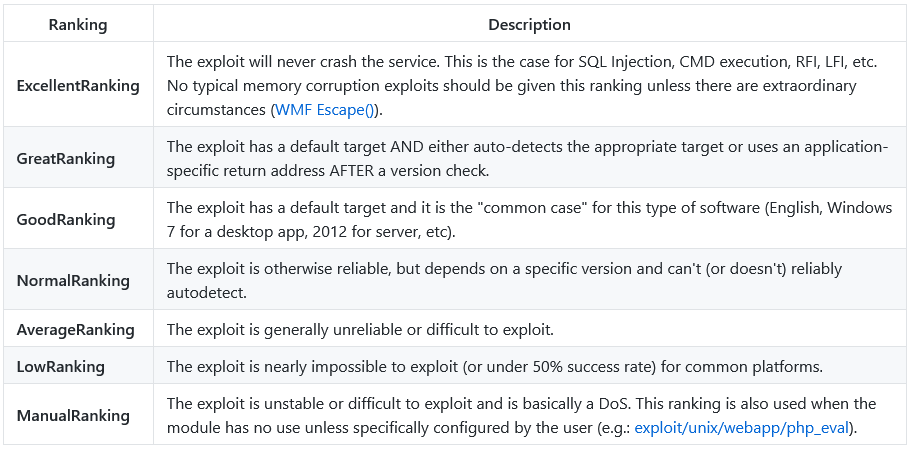
Puedes dirigir la función de búsqueda usando palabras como type y platform.
Por ejemplo, si quisiéramos que nuestros resultados sólo incluyeran módulos auxiliary, podríamos configurar el tipo a este.
msf6 > search type:auxiliary telnet

Matching Modules
================

   #   Name                                                Disclosure Date  Rank    Check  Description
   -   ----                                                ---------------  ----    -----  -----------
   0   auxiliary/admin/http/dlink_dir_300_600_exec_noauth  2013-02-04       normal  No     D-Link DIR-600 / DIR-300 Unauthenticated Remote Command Execution
   1   auxiliary/admin/http/netgear_r6700_pass_reset       2020-06-15       normal  Yes    Netgear R6700v3 Unauthenticated LAN Admin Password Reset
   2   auxiliary/dos/cisco/ios_telnet_rocem                2017-03-17       normal  No     Cisco IOS Telnet Denial of Service
   3   auxiliary/dos/windows/ftp/iis75_ftpd_iac_bof        2010-12-21       normal  No     Microsoft IIS FTP Server Encoded Response Overflow Trigger
   4   auxiliary/scanner/ssh/juniper_backdoor              2015-12-20       normal  No     Juniper SSH Backdoor Scanner
   5   auxiliary/scanner/telnet/brocade_enable_login                        normal  No     Brocade Enable Login Check Scanner
   6   auxiliary/scanner/telnet/lantronix_telnet_password                   normal  No     Lantronix Telnet Password Recovery
   7   auxiliary/scanner/telnet/lantronix_telnet_version                    normal  No     Lantronix Telnet Service Banner Detection
   8   auxiliary/scanner/telnet/satel_cmd_exec             2017-04-07       normal  No     Satel Iberia SenNet Data Logger and Electricity Meters Command Injection Vulnerability
   9   auxiliary/scanner/telnet/telnet_encrypt_overflow                     normal  No     Telnet Service Encryption Key ID Overflow Detection
   10  auxiliary/scanner/telnet/telnet_login                                normal  No     Telnet Login Check Scanner
   11  auxiliary/scanner/telnet/telnet_ruggedcom                            normal  No     RuggedCom Telnet Password Generator
   12  auxiliary/scanner/telnet/telnet_version                              normal  No     Telnet Service Banner Detection
   13  auxiliary/server/capture/telnet                                      normal  No     Authentication Capture: Telnet

Interact with a module by name or index, for example use 13 or use auxiliary/server/capture/telnet

msf6 >
Recuerda que los exploits se aprovechan de vulnerabilidades en el equipo objetivo, y que por lo tanto, un exploit calificado como bajo puede funcionar mientras que uno calificado como alto puede no funcionar o incluso colapsar el sistema.